How YouTube advertising works
To advertise on YouTube, you need a Google Ads account. You can use it to choose your video, who it’s shown to, the format (skippable or non-skippable video, feed recommendations, etc.), and how much you’re willing to spend. Once your video passes moderation, it can be shown worldwide.
To increase your chances of passing moderation, use specially prepared accounts with increased trust.
How much does YouTube advertising cost?
The monthly advertising price depends entirely on your interests and budget. You can advertise for $1/day, which will average around 7,000 impressions per week. In my experience, I recommend starting at $10/day, which will result in approximately 50,000 each week.
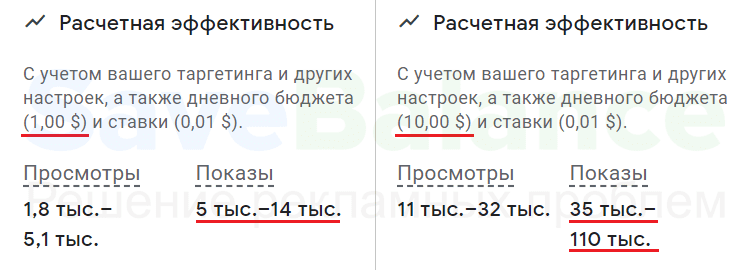
Of course, everything depends on your topic and competition. But in most niches, you can expect 20-30,000 impressions with a daily spend of $10.
Google has disabled advertising in Russia. What should I do?
As of March 4, 2022, Google has decided to leave Russia. All Russian Google Ads accounts have been frozen or closed. Currently, you can advertise on YouTube without restrictions using a advertiser . You can read more about how to bypass sanctions and top up your balance in a article .
How to Set Up Ads Yourself: Step-by-Step Instructions
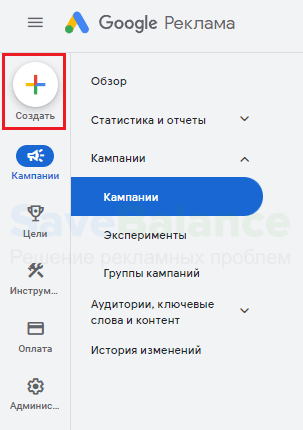
We’ll need a Google Ads account (YouTube advertising is managed by Google). If you’re using our accounts, simply log in. Click the plus sign in the upper left corner to start creating an ad, then select "Campaign."
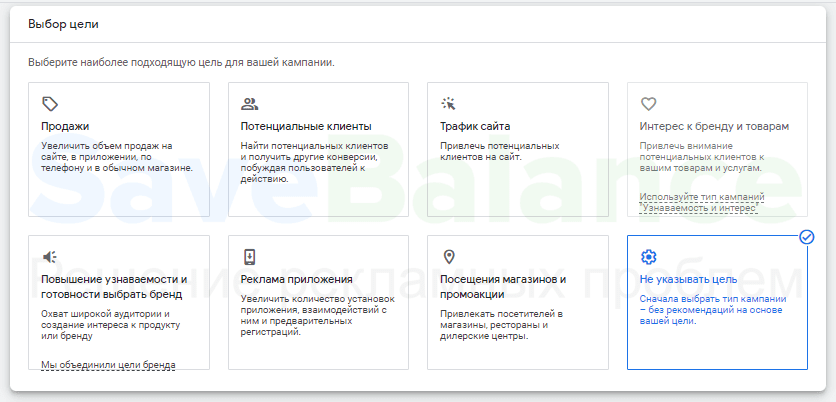
Next, you need to select a goal. I recommend leaving the campaign without a goal: this won’t affect ad performance, and we’ll have more control over the settings.
In the campaign type, select "Video".

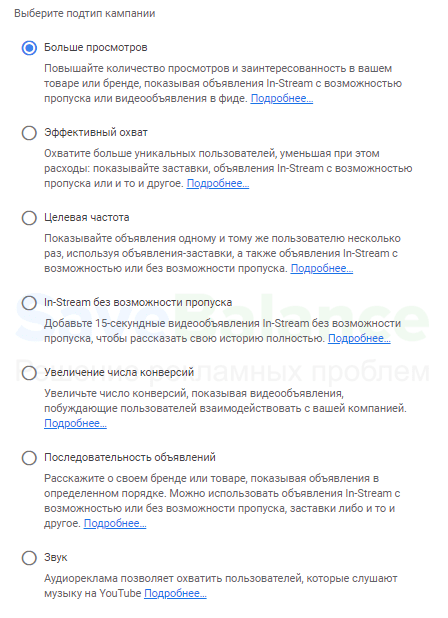
The choice of advertising campaign subtype depends on your goals. For your first campaign, I always recommend choosing the first subtype, "More Views." Click "Continue."
Let’s start setting up an advertising campaign:
- Enter a name for your campaign (no one but you will see it).
- The bidding strategy uses a maximum cost-per-view (CPV). This means you set the price for each view of your ad. A view is counted if a user watches your ad for more than 30 seconds (or less if the video is shorter). If the ad is skipped, you don’t pay.
- Select "Daily" as the budget type. This will help you control your advertising costs and avoid blowing your entire budget in one day. I recommend a daily budget of $10 or more to get started.
- In the "Networks" column, uncheck the partner resources to avoid wasting your budget.

- Select the target ad display location and languages. I recommend Russian and English.
Let’s move on to additional settings.
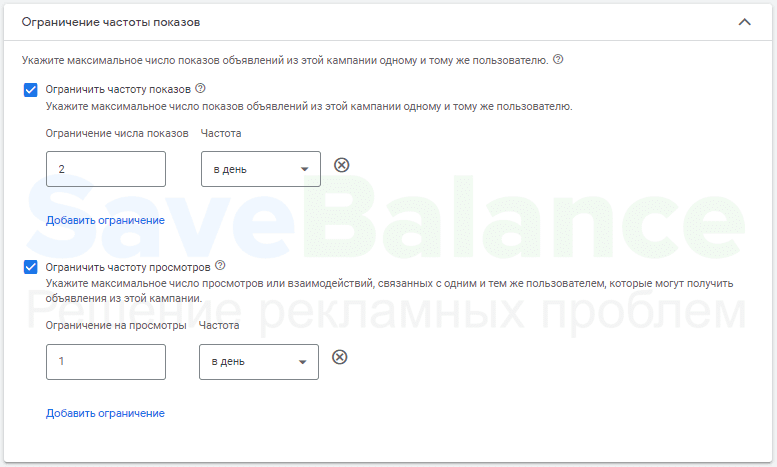
A very important point is frequency capping. You can limit the number of impressions and views per user to avoid the negative perception of repetitive advertising. This will also help your ad be seen by more people. For example, for a promotional video for a makeup store, I set the following metrics:
The next important step defining your target audience . Remember: the smaller your advertising budget, the more precise your target audience needs to be. You don’t have to fill out all the fields if you’re unsure what to include. If you choose too many criteria, no one will see your ad.
- We select gender, age, presence of children.
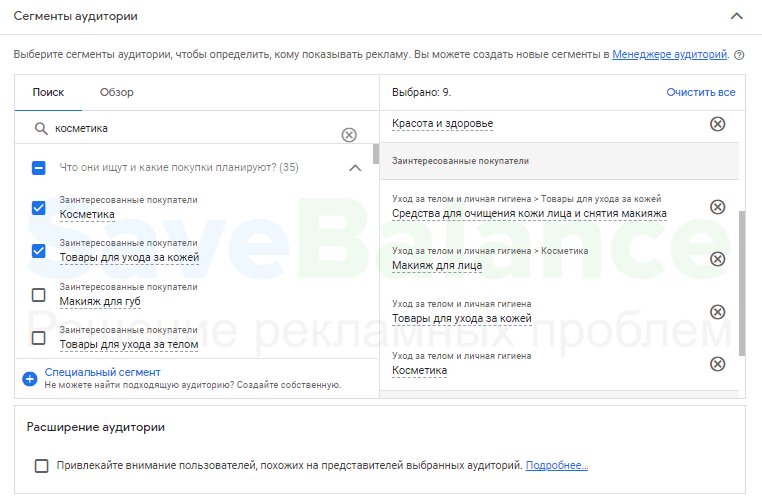
- Audience segments. Indicate what your potential clients/subscribers are primarily interested in. For example, people interested in makeup might search YouTube for reviews or watch makeup tutorials. For smaller budgets, I recommend targeting interests that are as closely related as possible.
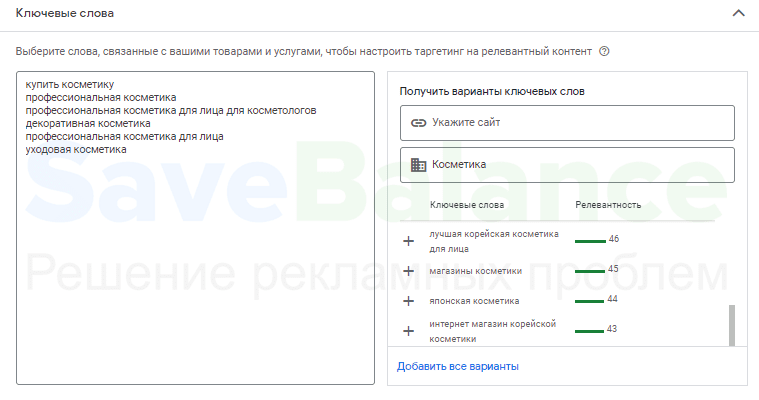
- Keywords. Google analyzes YouTube videos and can understand their content. You can enter your product or topic, and Google will suggest queries for which ads will be displayed. I recommend entering only queries that are directly relevant to your audience, or not entering any keywords at all.
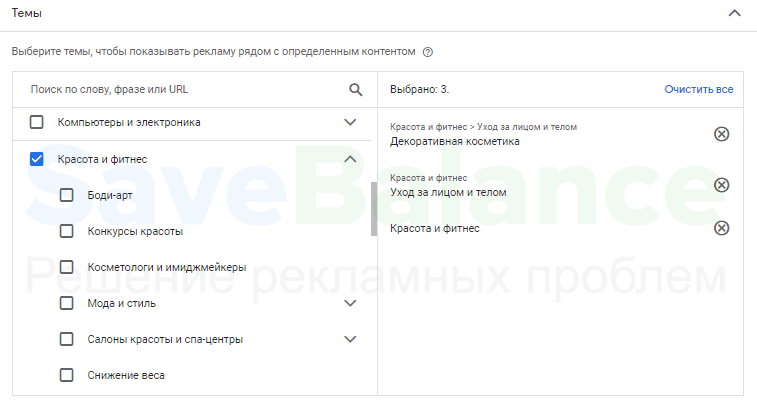
- Topics. Here, select the topic of the videos you want to show ads on. My Path: Beauty and Fitness - Face and Body Care - Decorative Cosmetics.
- In the placements, you can specify specific channels and videos where you want your ads to appear. But be careful: this can significantly reduce your potential audience.
All that’s left is to add the promotional video. I recommend starting with skippable in-stream ads. Add a clickable link and a call-to-action button.
In the lower right corner, there’s a "View ad on YouTube" button. Click it to see how the ad will appear to users.
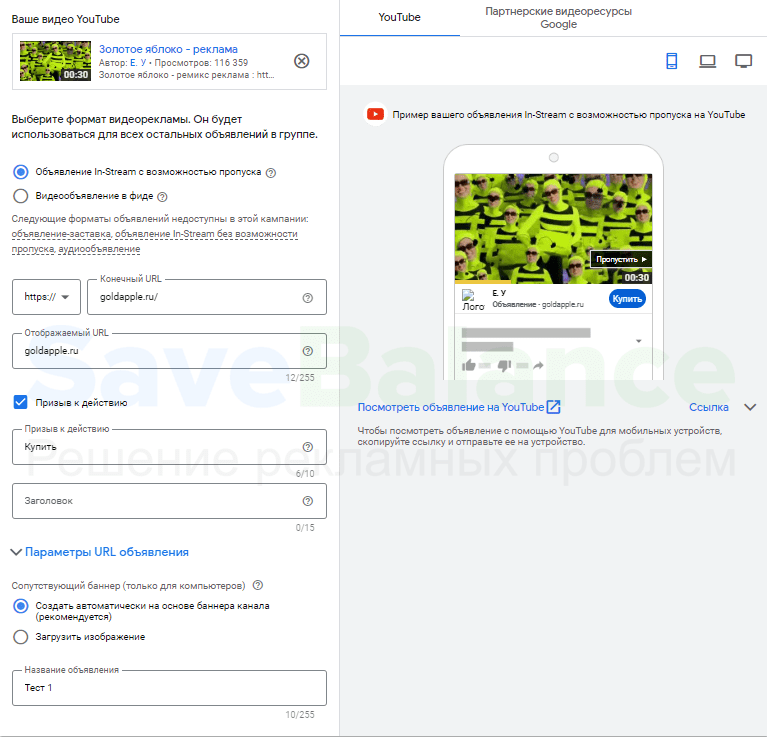
Finally, set the maximum cost per view for your ad. For starters, I recommend setting it to $0.01. Click "Create" and your first ad campaign is ready!
Afterword
YouTube an effective platform for advertising and promoting your brand. By following our instructions, you’ll avoid mistakes and be able to increase your views, boost your channel’s visibility, and attract the maximum number of subscribers or customers at minimal cost.
If you are from Russia, to bypass the restrictions, you only need to use the service of a dedicated foreign advertiser .
I hope we were able to help you.
Sincerely, Anastasia Kotelnikova and the SaveBalance team